
Biweekly AWS Bytes: Week 5 - Streamlining Deployment with AWS Elastic Beanstalk
Welcome to Week 5 of KTM One's biweekly AWS blog series! Following our deep dive into the serverless world of AWS Lambda last week, we are shifting gears to solve a universal headache for developers: infrastructure management. If you’ve ever spent more time configuring servers, load balancers, and firewalls than actually writing code, this week's focus on AWS Elastic Beanstalk is for you.
What is AWS Elastic Beanstalk?
AWS Elastic Beanstalk is a fully managed Platform-as-a-Service (PaaS) that acts as your personal infrastructure expert. It allows you to upload your code while it handles the heavy lifting of provisioning and managing the underlying AWS resources, including EC2 instances, load balancers, and auto-scaling groups.
Unlike rigid hosting platforms, Elastic Beanstalk offers "simplicity without compromise." It abstracts away the complexity of infrastructure setup but allows you to retain full control over the underlying resources if you need to fine-tune configurations. Whether you are running Java, Python, Docker, or Go, Elastic Beanstalk wraps your code in a production-ready environment in minutes, bridging the gap between code and cloud.
Key Highlights
- Automated Provisioning: Deploy production-ready applications in minutes. The service intelligently selects instance types, configures security groups, and sets up networking based on best practices.
- Built-in Scalability: Automatically handle traffic fluctuations. Elastic Beanstalk scales your application up during spikes and down during quiet periods, managing capacity without manual intervention.
- Language Agnostic: Supports a wide array of platforms including Java, .NET, Python, Node.js, PHP, Ruby, Go, and Docker, allowing you to use your preferred stack.
- Health Monitoring: Provides deep visibility into application health via CloudWatch, automatically replacing failed instances to create a self-healing architecture.
- Deployment Strategies: Supports Rolling, Blue/Green, and Immutable deployments out of the box, allowing you to update applications with zero downtime and minimal risk.
- Seamless Integration: Connects effortlessly with RDS, ElastiCache, and S3, creating secure ecosystems through simple environment variable configurations.
Top Use Cases of AWS Elastic Beanstalk
Web Application Deployment
Standard Web Tier
Traditional web application deployment often bottlenecks development velocity. Teams frequently spend weeks manually configuring web servers, SSL certificates, and load balancers before a single line of code goes live. Furthermore, manual resource management leads to either wasteful over-provisioning or performance-killing under-provisioning during traffic surges.
Elastic Beanstalk transforms this by treating the infrastructure as a wrapper around your code. It automatically detects your application type (e.g., a WAR file for Java or ZIP for Node.js) and builds the environment accordingly.
Common Problem Statements:
- How can we launch a production-ready web app without managing OS patches and network config?
- What is the most efficient way to handle unpredictable traffic spikes without manual scaling?
- How do we ensure high availability across multiple Availability Zones without complex networking?
- Can we implement zero-downtime deployments without writing custom scripts?
Solution Architecture:
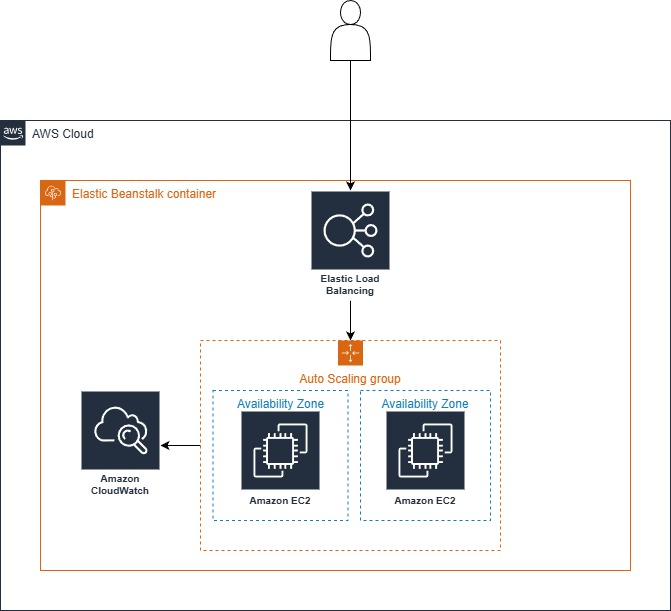
You package your code and upload it to Elastic Beanstalk. The service provisions a Web Server Environment consisting of an Application Load Balancer (ALB) handling incoming traffic, an Auto Scaling Group managing EC2 instances across multiple Availability Zones, and CloudWatch for monitoring. The ALB distributes requests to healthy instances, while the Auto Scaling Group adds or removes instances based on CPU or network triggers defined in your configuration.
Asynchronous Task Processing
Worker Environments
Modern applications often need to perform heavy lifting, generating PDF reports, processing images, or sending bulk emails, that shouldn't block the main web interface. Handling these tasks within the web request cycle leads to timeouts and poor user experience. Traditional solutions involve building complex custom worker fleets and queue polling logic.
Elastic Beanstalk solves this via Worker Environments, which are specifically designed to run background processes derived from a queue, completely decoupling the user interface from heavy backend processing.
Common Problem Statements:
- How can we process resource-intensive tasks without slowing down the user-facing website?
- What is the best way to buffer bursts of tasks (like data imports) to prevent system overload?
- How do we scale background workers independently from the web servers?
- Can we automatically retry failed tasks without writing custom error handling logic?
Solution Architecture:
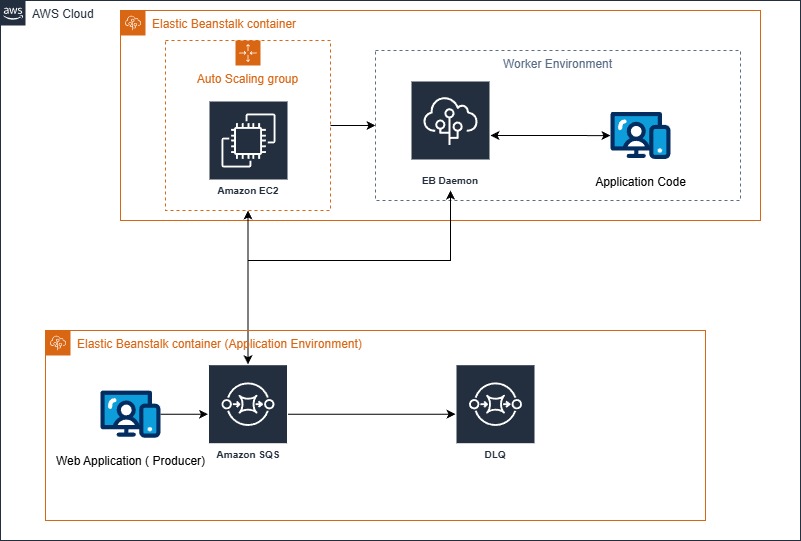
Deploy a separate Elastic Beanstalk Worker Environment. This environment automatically installs a daemon on your instances that polls an Amazon SQS (Simple Queue Service) queue. When your web application places a job in the queue, the daemon pulls the message and sends it to your application code via a local HTTP POST request. If the processing fails, Elastic Beanstalk handles the retry logic and Dead Letter Queues (DLQ) automatically. The worker fleet scales based on queue depth, ensuring you have enough power to clear the backlog during busy periods.
Microservices Architecture
Distributed System Management
As applications grow, monolithic structures become unwieldy. Moving to microservices solves this but introduces operational nightmares: managing dozens of independent deployment pipelines, service discovery, and unique scaling rules for every service. Manually orchestrating this infrastructure is error-prone and creates "dependency hell."
Elastic Beanstalk simplifies microservices by allowing you to treat every service as a distinct Environment. This ensures isolation while maintaining a unified management interface.
Common Problem Statements:
- How can we manage the lifecycle of ten different services without ten different deployment processes?
- What is the reliable way for Service A to find and talk to Service B dynamically?
- How do we prevent a failure in one service from crashing the entire application?
- Can we scale our "Billing" service differently from our "User Profile" service?
Solution Architecture:
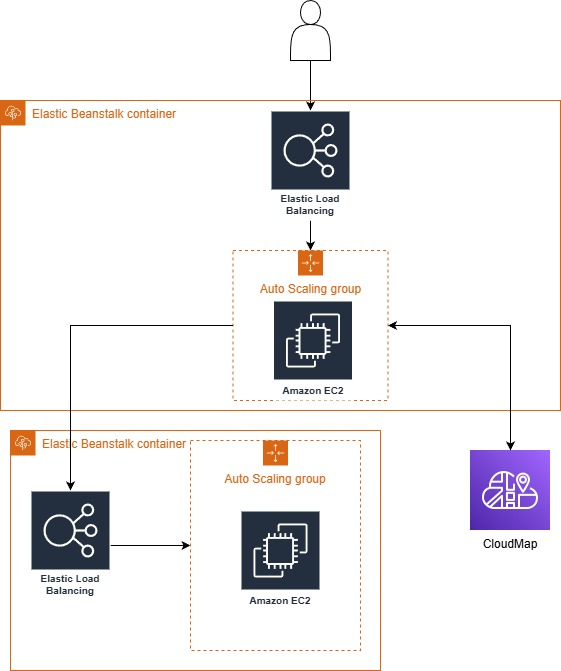
Each microservice is deployed to its own dedicated Elastic Beanstalk environment (e.g., one environment for the "Order Service" and another for the "Inventory Service"). This provides complete resource isolation. For communication, integrate with AWS Cloud Map for service discovery, allowing services to locate each other via logical names rather than hard-coded IPs. Each environment manages its own Load Balancer and Auto Scaling settings, ensuring that a high-traffic service gets more resources without over-provisioning the rest of the system.
Continuous Deployment (CI/CD)
Automated Pipelines
Manual deployments, copying files, restarting services, and editing config files, are the enemy of stability. They introduce human error and make rollbacks difficult. As teams grow, ensuring that Development, Staging, and Production environments stay synchronized requires rigorous discipline or, better yet, automation.
Elastic Beanstalk acts as the perfect deployment target for CI/CD pipelines, removing the "human element" from the release process entirely.
Common Problem Statements:
- How can we eliminate manual errors during the deployment process?
- What is the fastest way to move code from a GitHub commit to a live URL?
- How do we automate testing in a staging environment before hitting production?
- Can we standardize the release process across all developers and teams?
Solution Architecture:
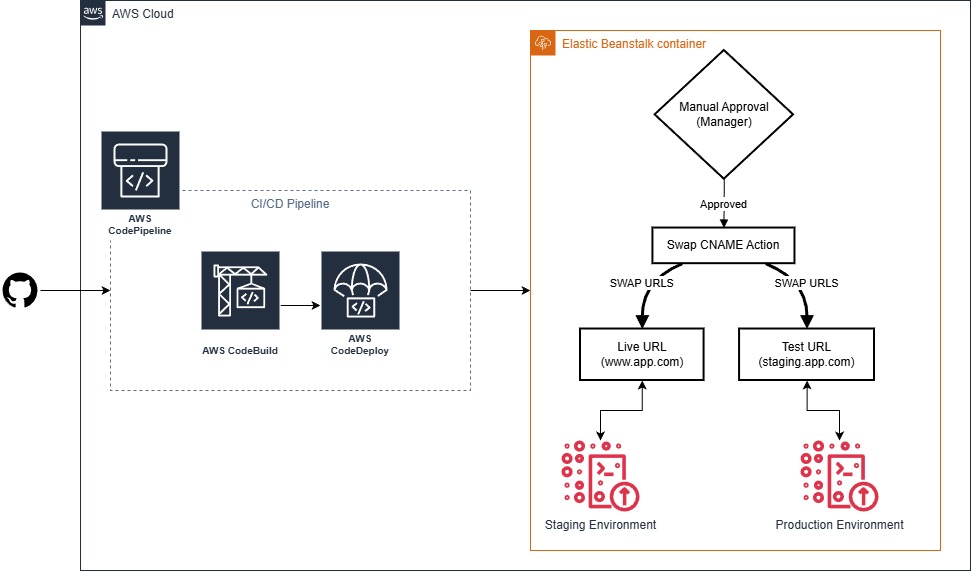
Integrate AWS CodePipeline with Elastic Beanstalk. The workflow begins when a developer pushes code to a repository (like GitHub or AWS CodeCommit). CodePipeline triggers a build (via CodeBuild), runs automated tests, and finally deploys the artifact to your Elastic Beanstalk environment. You can configure the pipeline to deploy to a "Staging" environment first, wait for approval, and then promote the version to "Production" using Elastic Beanstalk's Swap URL feature for an instant cutover.
Best Practices and Considerations
Configuration Management
Avoid hardcoding credentials or settings. Use Elastic Beanstalk Environment Variables to pass configuration data (DB strings, API keys) to your application. Leverage .ebextensions (configuration files) to script the setup of your environment, ensuring that your infrastructure is defined as code and is reproducible.
Performance Optimization
Right-size your EC2 instances based on your specific workload, memory-intensive apps may need the r family, while compute-heavy apps need the c family. Utilize CloudFront in front of your Elastic Beanstalk environment to offload static content delivery, reducing the load on your application servers.
Cost Management
Take advantage of Elastic Beanstalk's seamless integration with Spot Instances for your test and staging environments to reduce costs by up to 90%. For production, ensure your Auto Scaling policies are aggressive enough to scale down quickly when traffic subsides, so you aren't paying for idle CPUS.
Security First
Always deploy your Elastic Beanstalk environments inside a VPC. Use the principle of least privilege for the Instance Profile (IAM Role) assigned to your EC2 instances, give them access only to the specific S3 buckets or DynamoDB tables they need, and nothing else.
Conclusion
AWS Elastic Beanstalk represents the "sweet spot" of cloud computing: the ease of a managed service with the power of configurable infrastructure. It removes the barriers to entry for deploying scalable, highly available applications, allowing startups and enterprises alike to focus on business logic rather than server maintenance.
Whether you are hosting a simple web app, processing background jobs, or orchestrating a complex microservices fleet, Elastic Beanstalk provides the automation to do it reliably and the flexibility to do it your way.
Stay tuned for our next post in the AWS Bytes series as we continue demystifying the services that power the modern web.