
Biweekly AWS Bytes: Week 6 - Mastering Elasticity with Auto Scaling and ELB
Welcome to Week 6 of KTM One's biweekly AWS blog series! After last week's deep dive into the serverless magic of AWS Lambda, we’re shifting our focus back to the backbone of resilient infrastructure. This week, we are exploring the dynamic duo of cloud architecture: Amazon EC2 Auto Scaling and Elastic Load Balancing (ELB).
If Lambda is your team of invisible assistants, think of Auto Scaling and ELB as your high-tech traffic control and stadium management system. They ensure that no matter how many fans (users) show up, there’s always enough seating (capacity) and everyone finds the right entrance without a bottleneck.
What are Auto Scaling and ELB?
Elastic Load Balancing (ELB) is the Receptionist of your application. It sits at the front, accepting incoming application traffic and distributing it across multiple targets, such as EC2 instances, containers, or even Lambda functions, across different Availability Zones. This ensures that no single server becomes overwhelmed while others sit idle.
Amazon EC2 Auto Scaling is the Foreman that manages your fleet. It monitors your applications and automatically adjusts the number of EC2 instances to maintain steady, predictable performance at the lowest possible cost. When traffic spikes, it launches new instances; when the crowd leaves, it gracefully terminates the extras.
Together, they create a self-healing, elastic environment that responds to real-time demand without manual intervention.
Key Highlights
- High Availability & Fault Tolerance: ELB only routes traffic to healthy targets. If an instance fails its health check, the Load Balancer stops sending traffic to it, and Auto Scaling immediately replaces it.
- Dynamic & Predictive Scaling: Scale based on real-time metrics (like CPU usage) or use Machine Learning with Predictive Scaling to anticipate traffic surges before they happen.
- Cost Efficiency: By scaling down during off-peak hours, you stop paying for idle resources, effectively matching your cloud spend to your actual user demand.
- Traffic Management (Layer 7 vs Layer 4): Choose between Application Load Balancers (ALB) for smart, URL-based routing (Layer 7) or Network Load Balancers (NLB) for ultra-low latency and millions of requests per second (Layer 4).
- Seamless Integration: Both services integrate natively with CloudWatch for monitoring, IAM for security, and Certificate Manager (ACM) for effortless SSL/TLS encryption.
Top Use Cases of Auto Scaling and ELB
High-Traffic Web Scenarios
The Flash Sale Resilience
E-commerce platforms often face unpredictable spikes during seasonal sales or viral marketing moments. Without automation, these spikes lead to 504 Gateway Timeouts and lost revenue.
Common Problem Statements:
- How can we prevent our web servers from crashing when traffic triples in minutes?
- How do we ensure a smooth user experience without paying for peak capacity 24/7?
- What is the best way to handle session persistence (stickiness) in a scaled environment?
Solution Architecture:
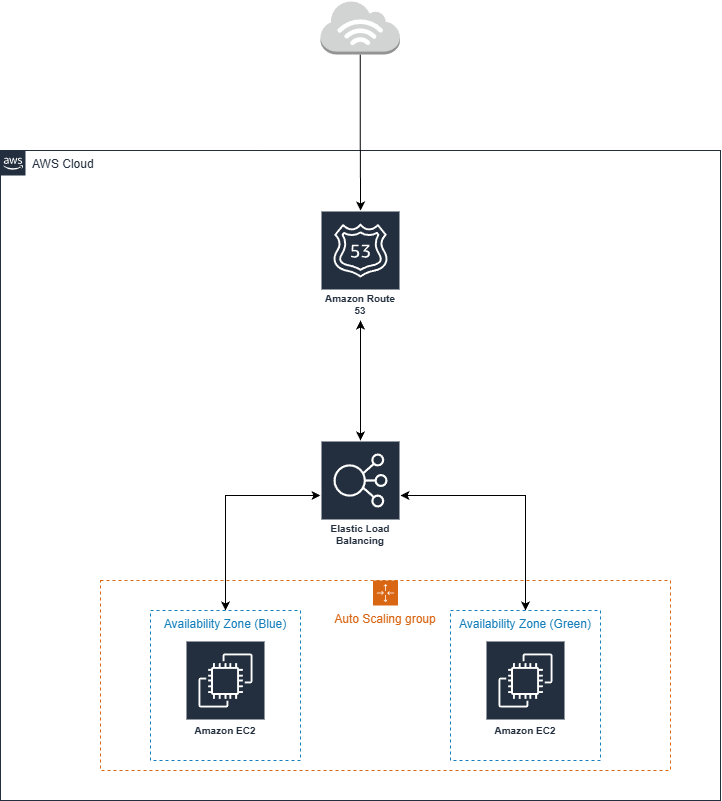
Deploy your application in an Auto Scaling Group (ASG) spread across at least two Availability Zones. Place an Application Load Balancer (ALB) in front of the ASG. Configure a Target Tracking Policy to keep average CPU utilization at 50%. As the ALB sees a surge in requests, the ASG will launch new instances to share the load. Use Sticky Sessions (Cookie-based) if your app requires users to stay connected to the same server for their shopping cart.
Microservices Routing
Path-Based Routing Strategies
Modern applications are often broken into smaller services (e.g., /orders, /users, /payments). Managing separate entry points for each service is an operational nightmare.
Common Problem Statements:
- How can we route traffic to different backend services using a single URL?
- How do we scale our Payment service independently from our Product Catalog?
- How can we perform Blue/Green deployments with zero downtime?
Solution Architecture:
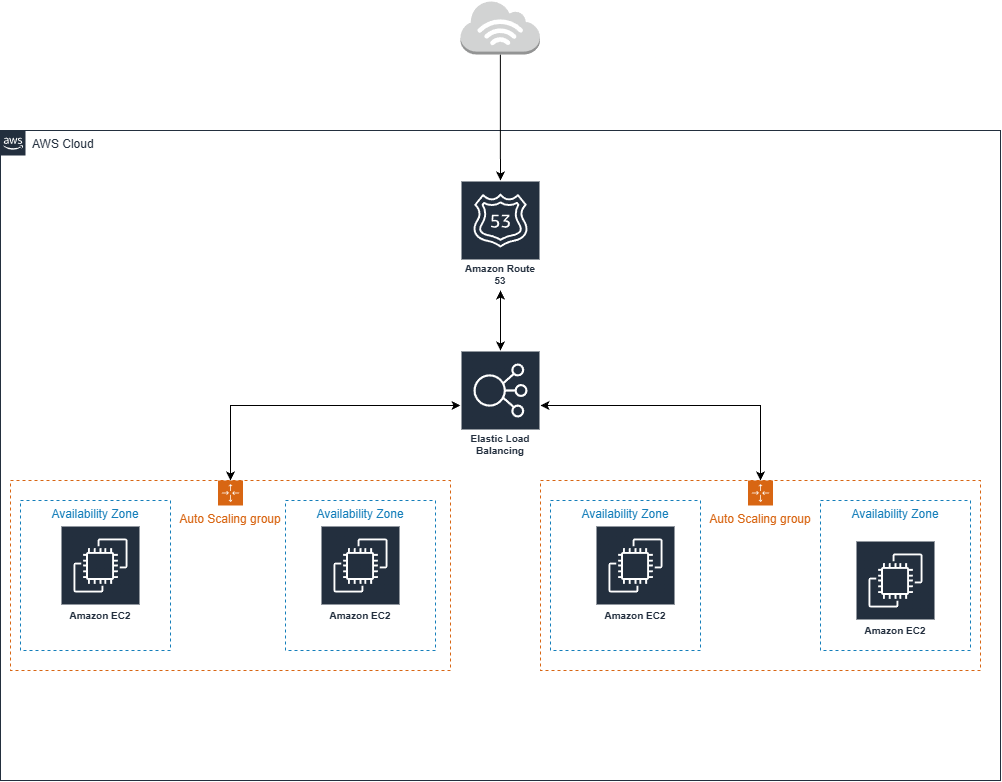
Use an ALB with Path-Based Routing. Define listener rules that forward traffic to different Target Groups based on the URL path. Each Target Group is backed by its own Auto Scaling Group, allowing the Orders service to scale up during a rush while the User Profile service stays small. Use Weighted Target Groups to shift traffic from an old version (Blue) to a new version (Green) gradually.
Self-Healing & Maintenance
Automated Fleet Recovery
Hardware fails, and software occasionally hangs. In a traditional setup, this requires an on-call engineer to manually reboot or replace the server.
Common Problem Statements:
- How do we automatically replace a server that has frozen or lost network connectivity?
- Can we ensure our application always has a minimum number of healthy nodes running?
- How do we update our server's OS or code without taking the whole site offline?
Solution Architecture:
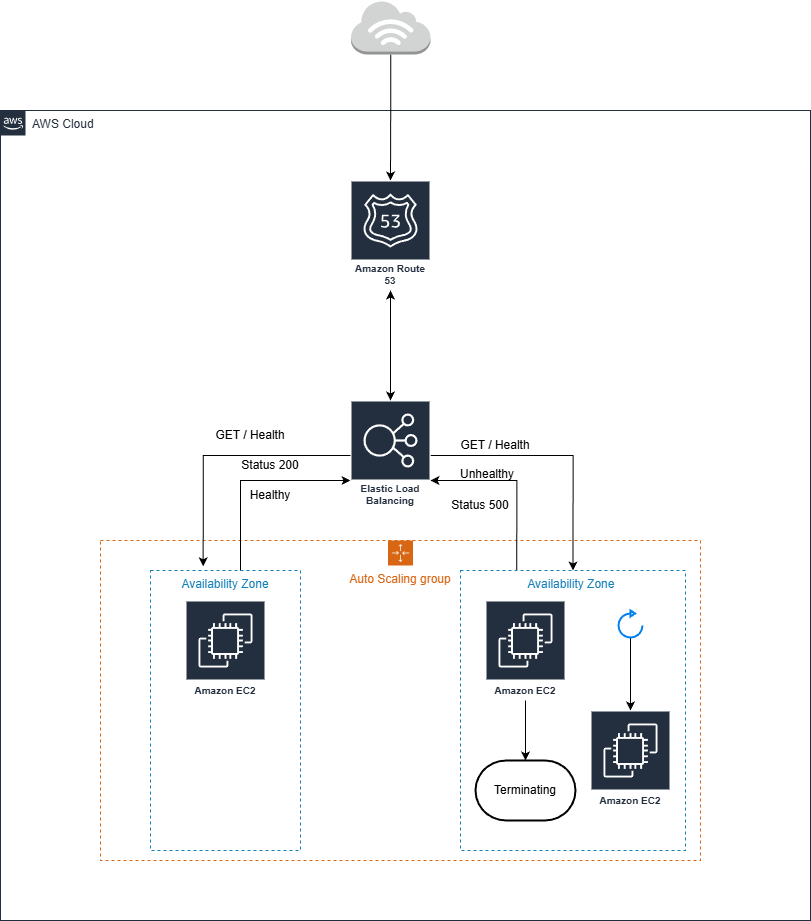
Set the ASG's Minimum Capacity to your baseline requirement. Configure ELB Health Checks rather than just EC2 status checks; this ensures that if the web service (e.g., Nginx or Apache) stops responding, the instance is marked unhealthy. The ASG will then terminate the failed instance and launch a fresh one from your Launch Template. For updates, use Instance Refresh to replace instances one by one, ensuring continuous availability.
Best Practices and Considerations
Performance Optimization
- Choose the Right Metric: Don't just scale on CPU. For I/O-heavy apps, scale based on Request Count Per Target or Memory Utilization.
- Cooldown Periods: Set appropriate cooldown timers to prevent flapping, where the system scales up and immediately back down before the new instances have finished warming up.
Security Considerations
- Security Group Nesting: Configure your EC2 security groups to only allow inbound traffic from the Load Balancer’s security group ID. This prevents anyone from bypassing your firewall and hitting your servers directly.
- SSL Offloading: Terminate HTTPS at the Load Balancer level. This unburdens your EC2 instances from the heavy lifting of encryption/decryption, allowing them to focus on processing application logic.
Monitoring and Observability
- CloudWatch Alarms: Set alerts for UnhealthyHostCount. If this number rises, it’s a sign that your application code might be failing even if your infrastructure is up.
- Access Logs: Enable ELB Access Logs (stored in S3) to analyze traffic patterns, identify malicious IPs, and troubleshoot 4xx/5xx errors.
Conclusion
Auto Scaling and Elastic Load Balancing represent the shift from fragile infrastructure to liquid infrastructure. By decoupling your entry point (ELB) from your compute power (ASG), you create a system that doesn't just survive growth, it thrives on it.
Whether you're running a small blog or a global enterprise application, these tools allow you to sleep better at night, knowing your environment is watching its own health and managing its own costs.